plyce · AI Agent #3
Create personalised candidate outreach with AI
An in-depth product guide from plyce
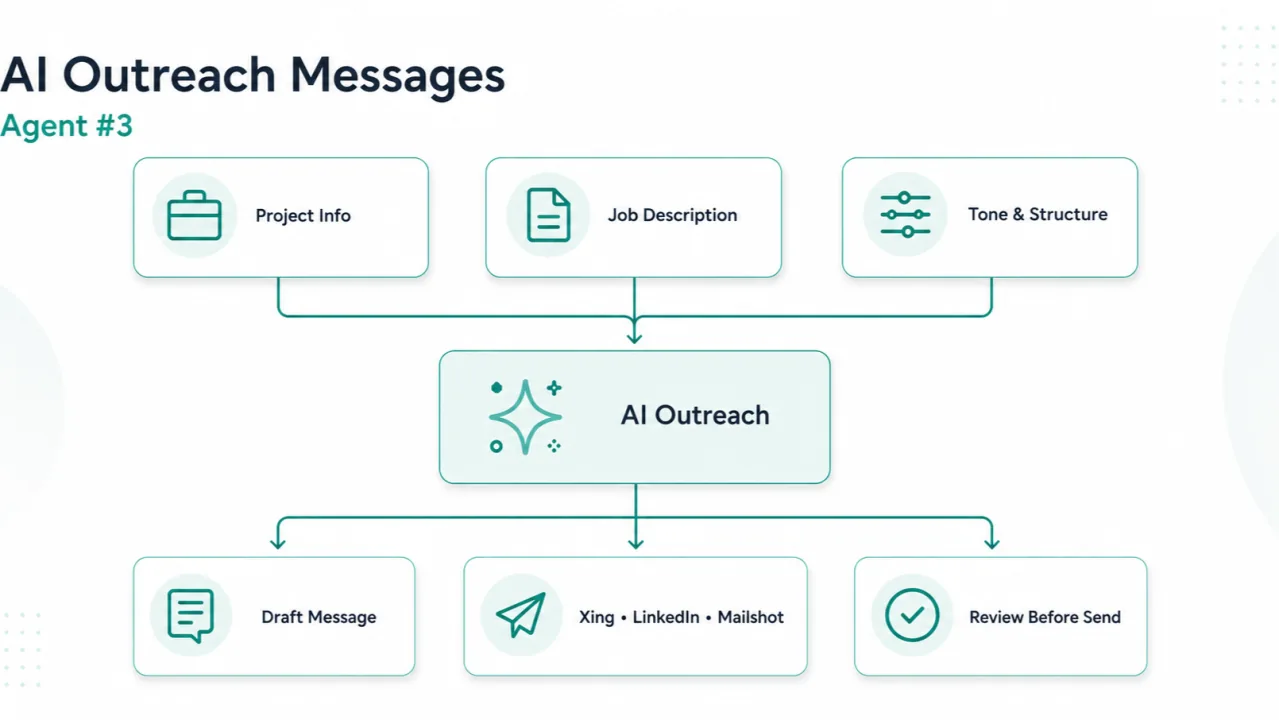
Strong active sourcing messages explain a relevant opportunity clearly. Generic templates and repeated copying between an ATS and an external AI chat tool make this harder than it needs to be.
AI Outreach Messages starts with the role and project information already available in plyce and produces editable message drafts for recruiter review.
Good outreach begins with a clear role
Candidates need to understand the opportunity, important requirements and reasons to reply. A long generic template is not a substitute for relevance.
Using the existing assignment brief helps the agent prepare a coherent first draft. Recruiters should still add the specific connection to the person they contact.
One brief, different communication channels
The same project can require a short LinkedIn approach, a more detailed Xing message or a structured email. The agent lets teams adjust length, tone and structure without repeatedly entering the same project data.
This reduces preparation time while maintaining control over what is actually sent.
- Use existing role and project context
- Choose suitable tone and length
- Review important conditions and claims
- Adapt each message to the intended candidate
Quality and consent still matter
AI-generated outreach should never invent experience, benefits or agreed terms. Candidate-specific details require verification. Teams are also responsible for the rules and data-protection obligations of the channel they use.
Example: Drafting outreach for a specialist role
A recruiter is preparing several messages for a senior IT vacancy.
- 1
Complete the job brief in plyce.
- 2
Generate a channel-appropriate draft.
- 3
Add verified reasons why the opportunity matches the recipient.
- 4
Review the final message before contacting the candidate.
Drafting is faster, but the recruiter controls relevance and sending.
Frequently asked questions
Which channels are supported?
The original agent description covers drafts for LinkedIn, Xing and email or mailshots.
Does the agent replace personalisation?
No. It prepares relevant copy using the assignment context; individual candidate details should be checked and added by the recruiter.
What is the main advantage over an external AI chat?
The job brief already exists in the recruiting workflow and does not need to be copied into a separate tool for every draft.